
fillbot.pro

AI Feedback:
Score: 75/100
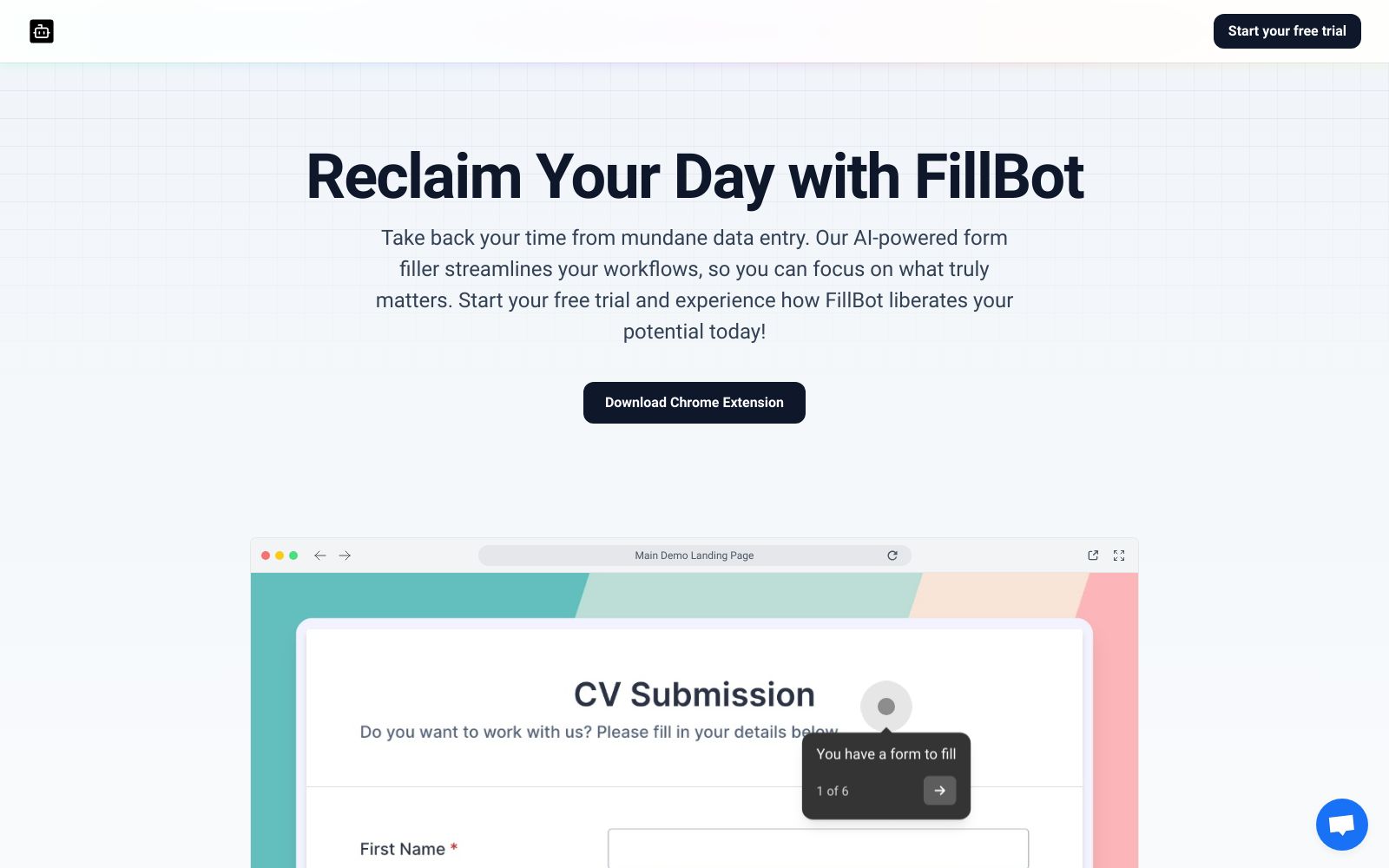
Review of the Hero Section
Good Aspects:
- Clear Value Proposition: The headline "Reclaim Your Day with FillBot" effectively communicates the main benefit: saving time on mundane tasks.
- Strong Supporting Text: The subheading provides further context about the AI-powered features that streamline workflows.
- Call to Action (CTA): The "Download Chrome Extension" and "Start your free trial" buttons are prominent, guiding users towards the next steps.
- Clean Design: The visual layout is simple and user-friendly, with good contrast between text and background.
- Engaging Visuals: The inclusion of a form submission snippet adds a layer of engagement, indicating actionable steps for users.
Areas for Improvement:
- Font Consistency: While the headline font is bold and clear, the subheading could benefit from a more consistent styling to avoid visual disconnection.
- Information Overload: The automatic form filling message could be distracting. Consider removing it or making it less prominent to maintain focus on the hero content.
- User Benefit Elaboration: Elaboration on specific features or outcomes resulting from the use of FillBot could make the offering more compelling.
- Visual Hierarchy: Use contrasting colors for the CTA buttons to draw more attention and differentiate between them.
- Mobile Responsiveness: Ensure that the design elements scale well on mobile devices, as many users may access the site from their phones.
Actionable Items:
- Refine Typography: Standardize font sizes and weights to enhance readability and visual cohesion.
- Clarify CTA Purpose: Consider changing the second CTA to something more descriptive, like "Get Started Now" or "Learn More."
- A/B Testing for CTAs: Test variations of the CTAs to determine which language or design leads to better conversions.
- Add Testimonials or Stats: Incorporate user testimonials or specific usage statistics to build credibility and trust.
- Optimize for Mobile: Conduct thorough testing across different devices to ensure usability and attractiveness on mobile.
Frequently Asked Questions
What is the "AI Landing Page Feedback" feature?
The "AI Landing Page Feedback" feature allows users to get AI-generated feedback and actionable insights on how to improve their website's landing page.
How does the "AI Landing Page Feedback" feature work?
Users provide the URL of their landing page, and the system takes a screenshot of the page, analyzes it using AI models, and generates feedback and suggestions for improvement.
Does this analyze the whole page or just the hero section?
The feature currently only analyzes the visible portion of the landing page screenshot.
Is there a limit to how many times I can use the "AI Landing Page Feedback" feature?
Each domain is allowed 1 free test per day. If you try to analyze the same domain more than once within a 24-hour period, the existing result will be returned instead of running a new analysis.
What information do I need to provide to use the "AI Landing Page Feedback" feature?
You need to provide the URL of your landing page that you want to analyze. Make sure the URL is accessible and starts with "http://" or "https://".
Can I get feedback on the mobile version of the landing page too?
Currently, the feature analyzes the desktop version of the landing page only.
How long does it take to get the AI-generated feedback for my landing page?
The analysis process may take a few seconds. You will see a message indicating that the AI is analyzing your landing page while it is in progress.
Can I share the AI-generated feedback report for my landing page with others?
Yes, each feedback report has a unique URL that you can share with others. The URL includes the hostname of your landing page and remains accessible for future reference.
Is the "AI Landing Page Feedback" feature free to use?
Currently, the feature offers 1 free test per domain per day. Additional tests or premium features may be available in the future.
What AI technology is used to generate the landing page feedback?
The feature utilizes advanced AI models and techniques to analyze the landing page screenshot and provide actionable feedback and suggestions based on best practices and industry standards.
What aspects of my landing page does the AI analyze?
The AI analyzes various elements of your landing page, including the layout, design, content, call-to-action buttons, and overall user experience. It takes into account best practices and industry standards to provide comprehensive feedback.
How accurate and reliable is the AI-generated feedback?
The AI models used for generating the feedback are trained on a large dataset of successful landing pages and are constantly updated to incorporate the latest trends and best practices. However, it's important to review the feedback critically and consider its applicability to your specific context.
Are there any limitations on the types of landing pages that can be analyzed?
The "AI Landing Page Feedback" feature can analyze most standard web-based landing pages. However, it may not be able to provide feedback on pages that heavily rely on interactive elements, animations, or require user input.
What if I disagree with some of the AI-generated feedback?
The feedback provided by the AI is meant to be suggestive and not definitive. It's based on general best practices and trends, but you know your audience and goals best. Use the feedback as a starting point for discussion and consider adapting it to your specific requirements.
Can I request additional feedback or clarification on the provided suggestions?
Currently, the feature provides a one-time feedback report based on the landing page screenshot. If you have further questions or need clarification, you can reach out to our support team, who will be happy to assist you.
Bring AI to your team today!