
How Protek saves hours on IT documentation and project planning with TypingMind
In conversation with Laura Mathis, IT Project Manager, Protek
20k+
messages sent in the last 6 months
11
team members using TypingMind
100%
team adoption
Managed IT Services
Chicago, USA
11
TypingMind has helped us get our heads around AI a lot better, work together more, and bring a real consistency to our communications and documentation that we didn't quite have before.

Overview
Protek is a Chicago-based managed services provider helping small and medium-sized businesses stay on top of their technology. From cloud modernization and service desk support to larger IT projects, Protek works with clients around Chicago, the surrounding areas, and across the country to make IT feel less stressful and more manageable.
In this conversation, Laura Mathis, IT Project Manager at Protek, shares how the team uses TypingMind to explore different AI models, build internal agents, standardize documentation, improve project planning, and roll out AI across the company with the right level of oversight.
About Protek

Laura, thanks for taking the time to speak with us. To start, can you tell us a bit about Protek?
We're a Chicago-based managed services provider, which is a fancy way of saying we handle IT for small and medium-sized businesses so they don't have to. Most of our clients are around Chicago and the surrounding areas, though we look after folks all over the country. When a client needs advice or help on the tech side, they call us. The reason could be moving them onto a modern cloud setup, service desk support that's quick and pleasant to deal with, or it's a bigger IT project they've been putting off for ages. At the end of the day our goal is to take the IT stress off the business owner's plate so they can stay on top of their tech.
There are eleven of us, and we like to keep things honest and easy. We're real people who are quick to help, and we don't try to squeeze every client into the same box. We meet business owners where they are and build the plan that makes the most sense for them.
Why TypingMind
When it came to picking a tool, TypingMind won us over with how many models it lets you play with. We really didn't want to marry ourselves to one model and just hope it stayed on top, because these LLMs are forever leapfrogging each other.
That goal of reducing IT stress for business owners comes through clearly. I'm curious how AI started to fit into that picture for your team.
What led your team to start exploring AI, and why did you choose TypingMind?
AI is where everything is heading right now, and we don't want to watch it roll past us. A big chunk of our work (for any business's work, really), is the same repetitive stuff on a loop. Alerts, summaries, planning, all the little things. We figured that if we could hand a lot of that off and pull information together faster, we'd free ourselves up to give our clients more personal attention.
Work with multiple models
When it came to picking a tool, TypingMind won us over with how many models it lets you play with. We really didn't want to marry ourselves to one model and just hope it stayed on top, because these LLMs are forever leapfrogging each other. One week it's ChatGPT, the next it's Claude, etc. Having all of them in one place so we can reach for whichever one suits the job is what we were after, and TypingMind is quick to add the new ones as they drop, so we're never waiting to try something.
Build skills/agents
The other thing was being able to build our own skills/agents. That keeps everyone on the team in the same direction, which matters because we're picky about our branding and our tone staying consistent actoss the board.
Use Cases & Most Valuable Features
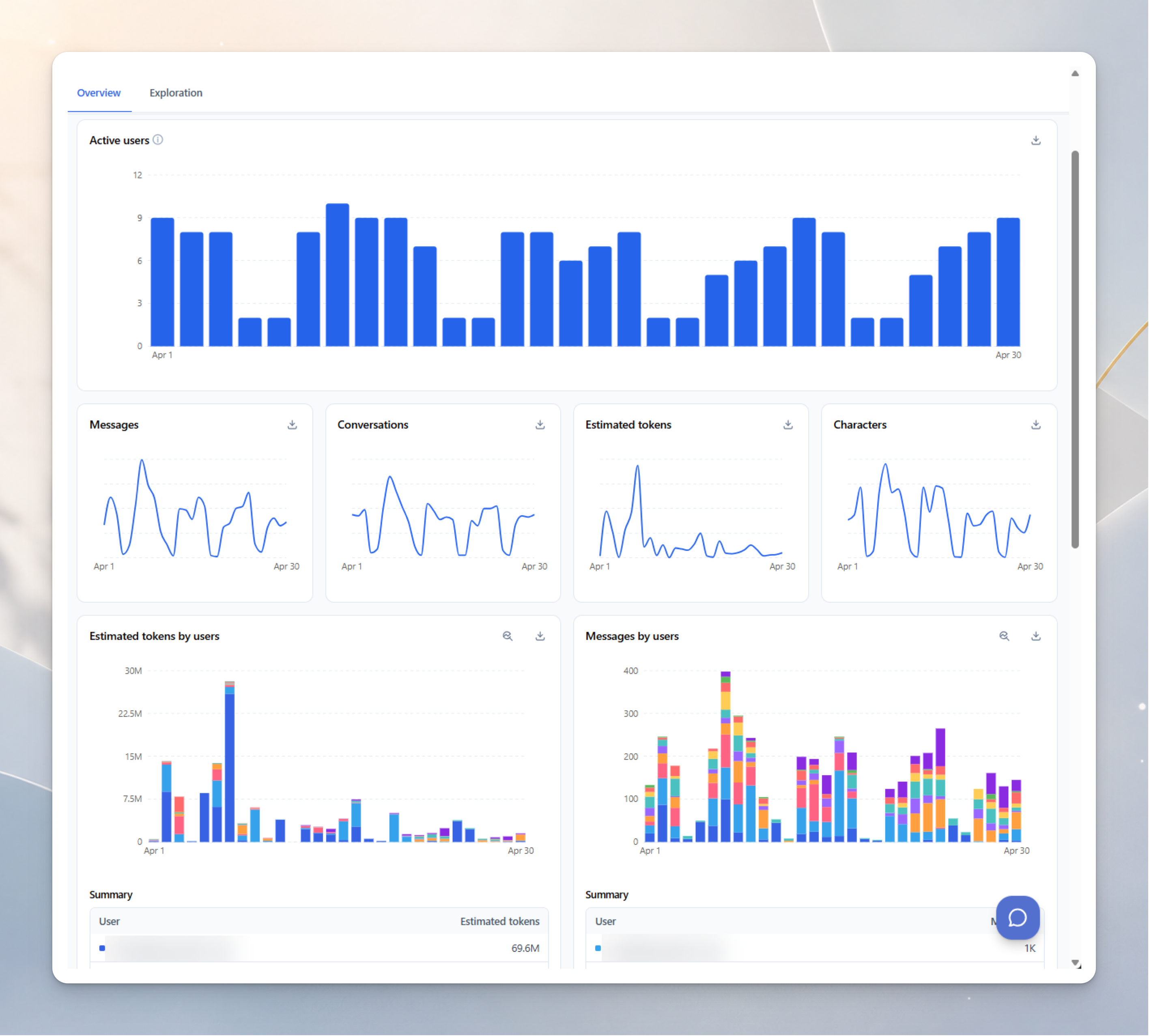
The admin portal makes rolling AI out across the team feel manageable instead of herding cats. We can see usage, manage access, set limits, and keep our internal and proprietary stuff under lock and key.
That makes sense. It sounds like flexibility was important from the start: being able to try different models, choose the right one for the job, and also shape the experience around how Protek works internally.
How does that show up in practice? What's your use case for TypingMind?
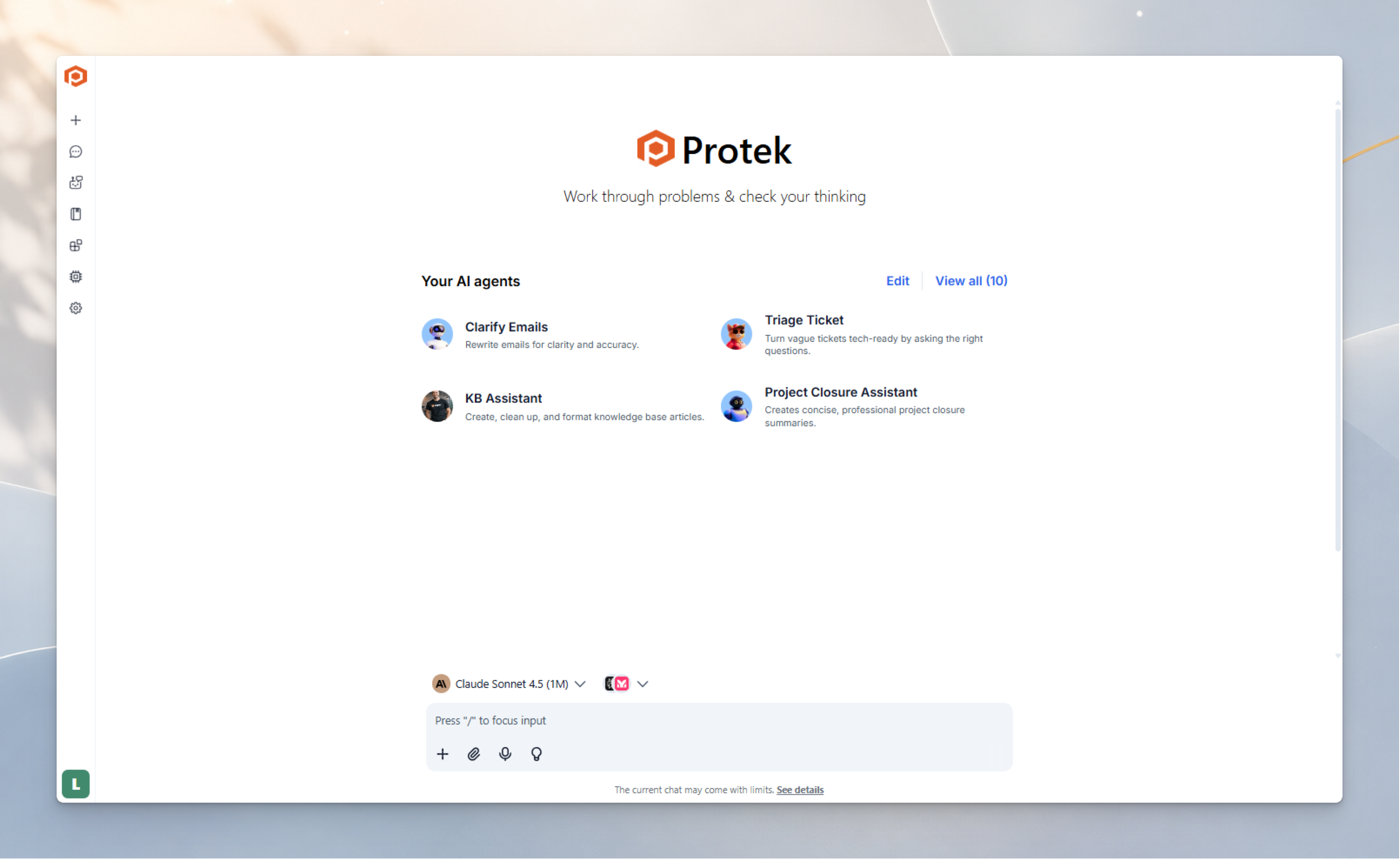
We've got a handful of agents set up, each one built for a specific job, for example:
Our knowledge base assistant.
We've taught it how we like our knowledge base articles written, everything from what belongs in them to the order the steps should go in, with prompts that keep every article following the same shape. So no matter who wrote it, all our articles have the same bones, which makes it easy to find what you're after. They also stick to clear, plain language, so you can skim one and get what you need without going through a wall of text.
The second is our drafter for work plans, which we run our project plans through before anything ever lands in front of a client.
It's great at catching the things we might have glossed over and flagging where we need a more detail to give an accurate quote. It's tidied up our quoting process, because now the quotes all look the part, clients know exactly what they're getting into, and everyone is clear about their responsibilities. That's been a big help for the more unusual projects, or the heavily custom ones that are built around one particular client's setup.
The way you describe those agents is interesting because they are tied to very specific parts of the workflow. They are not just there for general prompting, but for helping the team create knowledge base articles and work plans in a more consistent way.
From everything you use day to day, which TypingMind features are most valuable?
Two things:
- First being the agents I just mentioned.
The second is the oversight we get from the admin portal, which makes rolling AI out across the team feel manageable instead of herding cats.
From there I can see who's leaning on AI the most, which models and agents are used, roughly how much we're spending, and how the usage shakes out from one day or week to the next. I can put a cap on things, for example limiting which agents certain people can touch or setting a ceiling on usage. There are audit logs in there for peace of mind on the security side, we can plug in our own API keys, and the controls make it simple to decide who in the company gets access to what.
- That last bit is how we keep our internal and proprietary stuff under lock and key, which for an IT company is extremely important.
Metrics and Impact
In the last 6 months, we've sent over twenty thousand messages through TypingMind. All of those add up to a pretty impressive number of hours saved.
That combination of agents and admin controls seems like a useful balance: the team gets a practical way to use AI, while you still have visibility into usage, access, spending, and security.
With that in mind, has TypingMind fulfilled what you need?
Yes! Beyond just getting the work done, it's helped us get our heads around AI a lot better, work together more, and bring a real consistency to our communications and documentation that we didn't quite have before.
That's great to hear. When you look at the results so far, how do you measure whether TypingMind has been effective for the team?
Are there any key metrics or signs that stand out?
In the last 6 months, we've sent over twenty thousand messages through TypingMind. All of those add up to a pretty impressive number of hours saved on drafting documents, rewriting things for clarity, and keeping our communications sharp. It's also made our documentation more uniform and precise. We're always chasing ways to do it better, so that even when we're explaining something deeply technical, the client walks away knowing exactly what we meant.
Adoption has been great, and every single person on the team is using it.
Suggestions & Recommendation
That level of adoption is great to hear. When every person on the team is using the tool, it gives a much clearer picture of how AI fits into the daily workflow, not just as an experiment for a few people.
As your team continues using TypingMind, do you have any suggestions for improvement?
The big one would be more ways to collaborate, like being able to work in the same chat/project alongside a few teammates at once, with multiple files and people all pitching in on the same thing together. That would unlock a lot more value for us.
The other one would be more options for pulling in data sources for the knowledge base. Right now you've got a few to choose from like Google Drive, Notion, and GitHub, but we'd love an easy way to hook up more of them, the Microsoft suite chief among them, and to be able to set user controls and permissions on those sources while we're at it.
Thank you for sharing! That feedback makes a lot of sense.
For other companies thinking about adopting AI across their team, would you recommend TypingMind?
Yes! Especially the ones trying to keep pace with AI and work out which models serve them best instead of guessing. It does a great job of getting the team on the same page, the interface is simple enough that it doesn't matter how techy you are, and you've still got all those controls in the background so you can keep an eye on how it's being used.
Final Thought
Protek's experience shows how a managed IT services team can adopt AI in a practical, controlled way. With TypingMind, the team can access multiple models, create agents for repeatable workflows, and manage usage through the admin portal.
For Protek, TypingMind has become more than a place to chat with AI. It helps the team write clearer documentation, prepare better work plans, keep communication consistent, and stay aligned as AI continues to evolve.
Stay tuned for more stories!
Check out more