
If your company signs in with Okta or Microsoft Entra ID, the AI chat you roll out should too. For most companies, we'd pick TypingMind Teams. You connect Okta or Entra ID from an admin panel, Directory Sync adds new people and suspends leavers for you, and everyone chats with GPT, Claude, Gemini and other models on your own API keys. It runs on our cloud or on your own servers.
The other options: ChatGPT Business has single sign-on, but every person needs a seat ($25 a month for a standard seat), you only get OpenAI's models, and Directory Sync needs ChatGPT Enterprise. LibreChat is free and open source, and Open WebUI is free to self-host. Both can sign in with Okta or Entra ID, but an engineer has to set them up and keep the server running.
What to look for
Sign-in is only part of it. Before you choose, check four things:
- Sign-in with the work account. SAML or OpenID Connect (OIDC), so people use the Okta or Entra ID account they already have.
- Leavers lose access on their own. Directory Sync (SCIM) suspends an account when IT removes the person in Okta or Entra ID. Without it, someone has to remember.
- Groups that carry over. Your Okta or Entra ID groups should decide who gets which models and how much they can use.
- Your own API keys. You pay the AI provider for what people actually use, instead of a full seat for everyone, and you can use models from more than one provider.
How the options compare
Here's where each one stood in November 2026.
| TypingMind Teams | ChatGPT Business | LibreChat | Open WebUI | |
|---|---|---|---|---|
| Okta and Entra ID sign-in | SAML and OIDC | SAML and OIDC | OIDC or SAML, one at a time | OIDC. SAML only through a proxy |
| Directory Sync (SCIM) | Yes | Enterprise plan only | No | Yes |
| AI models | GPT, Claude, Gemini and more, on your API keys | OpenAI's | Many providers, on your API keys | Local models and compatible APIs |
| Price, billed monthly | $299/month, plus API usage | $25 a standard seat per month | Free, plus hosting | Free, plus hosting |
| Cost for 50 people, billed monthly | $659/month, plus API usage | $1,250/month | Hosting, plus API usage | Hosting, plus API usage |
| Who runs it | Us, or you | OpenAI | You | You |
TypingMind Teams Professional includes 5 seats, and each extra seat is $8. Billed yearly, it's $249 a month. ChatGPT Business is $25 per standard seat, or $20 billed yearly.
Which one to pick
- TypingMind Teams if you want Okta or Entra ID sign-in, Directory Sync and your own API keys, all set up from an admin panel instead of config files. It's on the Professional plan, hosted by us or on your own servers.
- ChatGPT Business if your team only needs OpenAI's models and paying for every seat is fine. For Directory Sync, you'd need ChatGPT Enterprise, which has no public price.
- LibreChat if you want free, open-source code and have an engineer to run it. Sign-in is set up in its
.envfile, and there's no Directory Sync. - Open WebUI if you mostly run local models and have an engineer to run it. It has Directory Sync and group sync, but sign-in is set up with environment variables, and you can only connect one OIDC provider at a time.
For more detail, see ChatGPT Business alternatives, LibreChat alternatives and Open WebUI alternatives.
How setup works in TypingMind Teams
You can do all of it from the admin panel, and it doesn't need an engineer.
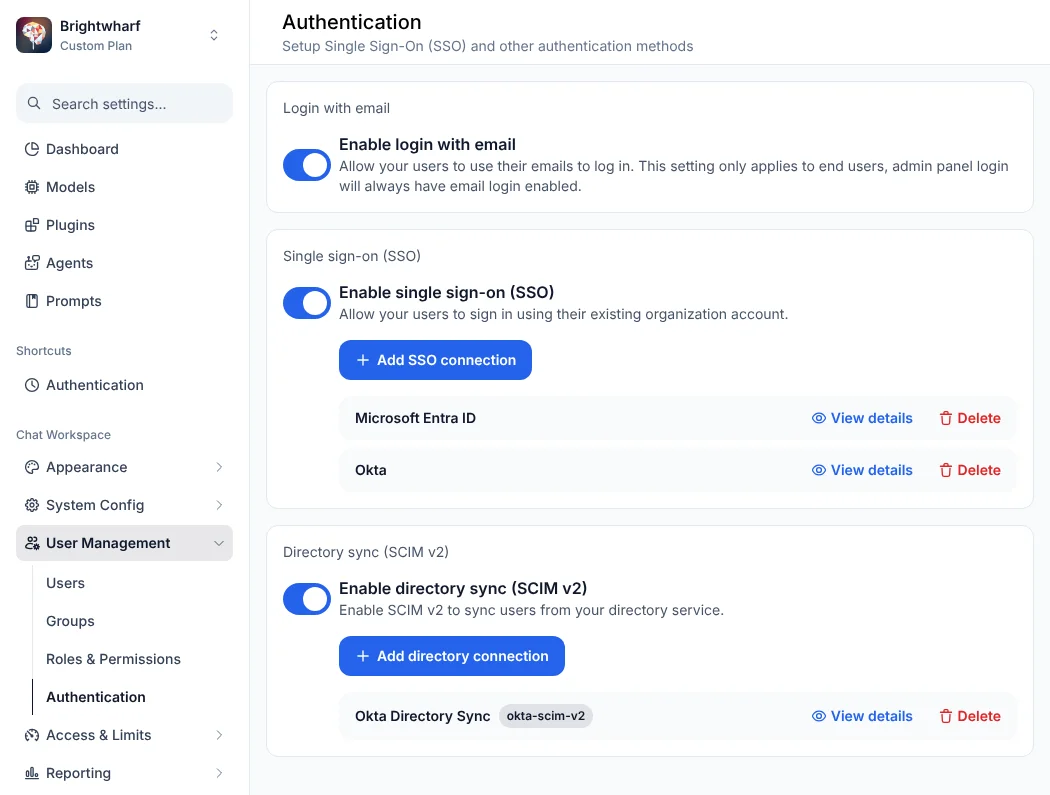
- In User Management > Authentication, turn on Enable single sign-on (SSO) and click Add SSO connection. TypingMind Teams shows an Entity ID and a Reply URL.
- Create a SAML app in Okta (Applications > Applications > Create App Integration > SAML 2.0) or in Entra ID (Enterprise applications > New application > Create your own application), and paste in those two values.
- Copy the app's metadata XML back into TypingMind Teams and click Add connection. Your staff now see a Use single sign-on (SSO) button when they log in.
- For Directory Sync, turn on Enable directory sync (SCIM v2) and click Add directory connection. Name it, pick your provider and click Add connection, then paste the SCIM Base URL and Secret it shows into your provider's provisioning settings.
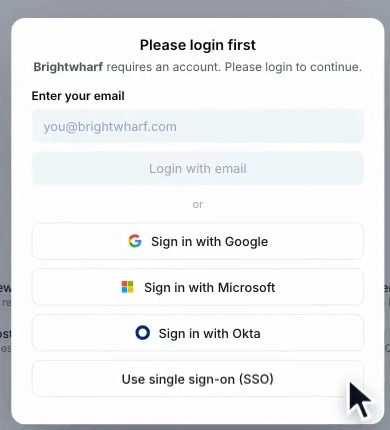
You can also connect Okta or Entra ID with OAuth 2.0 (OIDC) instead of SAML. Staff then get a button named after the connection, like Sign in with Okta.
Our docs have every click: single sign-on, Directory Sync and OAuth 2.0.
What Directory Sync keeps in step
- New people in Okta or Entra ID get an account, and leavers are suspended.
- Name and profile picture changes carry over.
- Each group comes across as
Group:plus its name, such asGroup:Marketing. Use these groups to decide who sees which models and AI agents, and to set usage limits. - Each synced account takes a seat. If someone already signed in with SSO before you turned on Directory Sync, their account is matched by email.
For the rest of the setup, such as adding your API keys and setting usage limits, see how to set up a self-hosted ChatGPT for your company.
Frequently Asked Questions
Which AI chat apps work with Okta and Microsoft Entra ID?
TypingMind Teams, ChatGPT Business, LibreChat and Open WebUI can all sign in with Okta or Entra ID. TypingMind Teams and Open WebUI also have Directory Sync (SCIM). ChatGPT only has it on Enterprise, and LibreChat doesn't have it.
Can we use Entra ID sign-in with our own OpenAI or Claude API keys?
Yes, with TypingMind Teams. You add your keys for OpenAI, Anthropic, Google and other providers in the admin panel, and staff sign in with Entra ID or Okta. The keys stay on the server, so staff never see them.
Is there a ChatGPT Enterprise alternative with SSO and SCIM for a small company?
TypingMind Teams Professional includes SAML and OIDC sign-in, Directory Sync, roles, usage limits and audit logs. It's $299 a month billed monthly, with 5 seats, then $8 for each extra seat, and you pay your AI provider for API usage.
Which other identity providers work?
AD FS, Google, JumpCloud, OneLogin, PingOne, Auth0, Rippling, and any other provider that supports SAML or OpenID Connect. Directory Sync works with Okta, Entra ID, OneLogin, JumpCloud and any provider that supports SCIM v2.
Does this work if we self-host?
Yes. A self-hosted TypingMind Teams has the same admin panel, so setup is the same. Self-hosting is a yearly contract. Request a quote for pricing.
Can people still log in with email?
That's up to you. You can keep email login on for staff, or turn it off once SSO or another sign-in method is set up, so everyone signs in with their work account. Admins can always log in to the admin panel with email.
Build a unified AI workspace for your team
- Access all AI models in one place
- Manage usage, costs & permissions per team
- Connect your own API keys
- ...and much more